
How to Fix Flat or Dull Lighting in a Photo
Light makes or breaks a photo. The same face looks tired under an office ceiling panel and relaxed in late-afternoon sun; the same mug looks cheap under a yellow kitchen bulb and appealing by a window. Most disappointing photos are not badly framed or out of focus, they are simply badly lit: flat, grey, harsh or the wrong colour.
Methodhelm editorial teamLast updated: 4 min read
This guide explains what makes light look flat, how to get better light while you are still shooting, and how to change the lighting of an existing photo with Photo relight on Methodhelm. It also covers, honestly, what an AI relight changes besides the light.
 Before
 After
AfterOn this page
Why a photo looks flat or dull
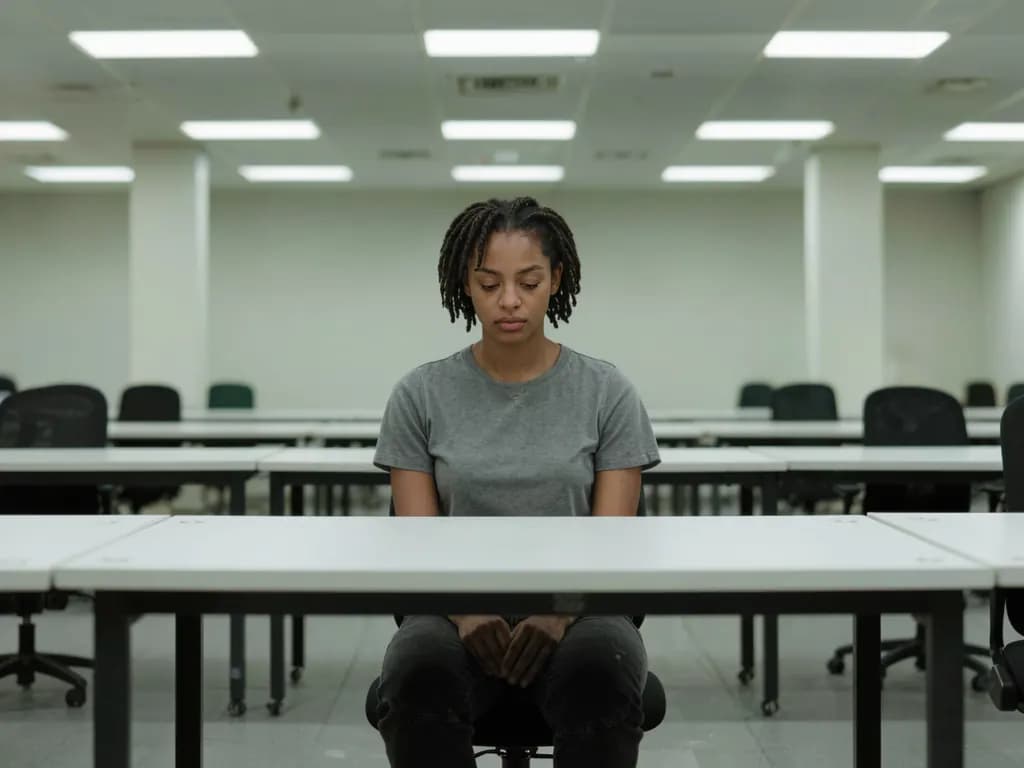
Flat light comes from everywhere at once: an overcast sky at noon, a big ceiling light, or a phone flash fired straight at the subject. With no direction, there are no gentle shadows to show shape, so faces look wide and products look like cut-out stickers.
Dull colour usually comes from mixed or weak light. A warm bulb and a cool window in the same room give skin a muddy cast, and a dim room makes the phone raise its sensitivity, which brings noise and washed-out colour. Harsh light is the opposite problem: midday sun or a bare bulb that creates hard shadows under the eyes and bright hot spots on the forehead.
Fix what you can while shooting
- Turn towards a window. Light from the side or at a 45° angle gives faces and objects shape. Switch off the ceiling light so it does not mix in.
- Avoid the flash for close portraits. It flattens faces and causes red eyes and shiny skin.
- In bright sun, move into open shade, such as the shady side of a building, where the light is soft but still bright.
- Use the hour before sunset when you can. Low, warm sun is flattering for portraits and gives scenes long, soft shadows.
- Bounce light with something white: a sheet of paper or a white wall opposite the window lifts dark shadows.
- Keep the phone steady in low light. A blurred photo cannot be saved by relighting; see how to fix a blurry photo.
Step by step: relight a photo with AI
- Choose a clear photo
One main subject works best: a portrait, a product or a room. Open Photo relight and upload a JPG, PNG or WebP of at least 128 px a side; larger photos are scaled to at most 1600 px before upload.
- Pick a lighting style
Choose a style. Golden hour is the default. After signing in you see the exact credit price before the run.
- Run the relight
It usually takes 20 to 60 seconds. Failed generations aren't charged — held credits come back automatically. Your result is kept for 24 hours to download.
- Compare before and after
Drag the slider and look closely at faces, skin, hands, hair and any text or logos. Check that the background and framing still work for you.
- Try a second style if needed
If the mood is not right, run the same photo with a softer or more neutral style, such as Soft light, and keep the version you prefer.
Which lighting style for which photo
- Golden hour and Sunset: warm, low light for portraits, couples, travel photos and anything that should feel relaxed.
- Soft light: the most neutral choice for profile pictures, family photos and dull indoor shots.
- Side light: stronger shadows that bring out shape and texture; good for moody portraits, food and objects.
- Backlight: a glow around the subject's edges, like the sun behind someone's hair.
- Blue hour and Moonlight: cool evening and night moods for city and travel scenes.
- Neon: strong coloured moods for creative posts.

Limitations: a creative edit, not a physical relight
An AI relight does not calculate how real light would fall on your scene; it generates a new version of the photo in the chosen light. Results vary from photo to photo, so treat it as a creative edit.
- Besides the light, faces, skin, colours, textures and small details can change, and so can the background, light sources such as windows or lamps, and the framing.
- The result is about 1 megapixel (for example 1024 × 1024 px), in the standard shape closest to your photo, so the edges may be slightly trimmed or extended.
- Do not use relit photos where an unedited photo is required, such as passport and ID photos; see our passport photo guide instead.
- Only upload photos you have the rights to, and photos of other people only with their consent.
Frequently asked questions
Can AI fix a photo that is too dark?
It can give a dim photo new, brighter light, but it generates the result rather than recovering hidden detail, so faces and textures may change. A very dark, noisy photo often works better if you reshoot with more light.
What does golden hour lighting mean?
The time shortly after sunrise and before sunset, when the sun is low and the light is warm and soft. The Golden hour style imitates that look on an existing photo.
Will relighting change my face?
It can. Besides the light, the AI may change facial details, skin, colours and the background. Compare the result carefully, especially for photos of people.
Why is my relit photo a different shape?
The result comes in the standard shape closest to your photo, such as 4:3 or 9:16, at about 1 megapixel, so the edges may be slightly trimmed or extended.
Can I relight product photos?
Yes. Soft light suits most products. Check labels and logos afterwards, because small text can change. For a styled setting rather than new light, use Product scene photos.
Related guides

 How to Turn a Selfie Into a Professional LinkedIn HeadshotTake a selfie that works as a profile photo, decide whether an AI headshot helps, and check the result still looks like you.
 How to Turn a Photo into Anime or Cartoon ArtPick a photo that converts well, choose from nine drawing and animation styles, and know what the AI changes along the way.
Related tools


Give your photo new light
Upload a portrait, product or scene, choose a lighting style and compare before and after. You see the credit price before it runs, and a failed run returns the held credits.